How much can you still do three weeks before Black Friday?
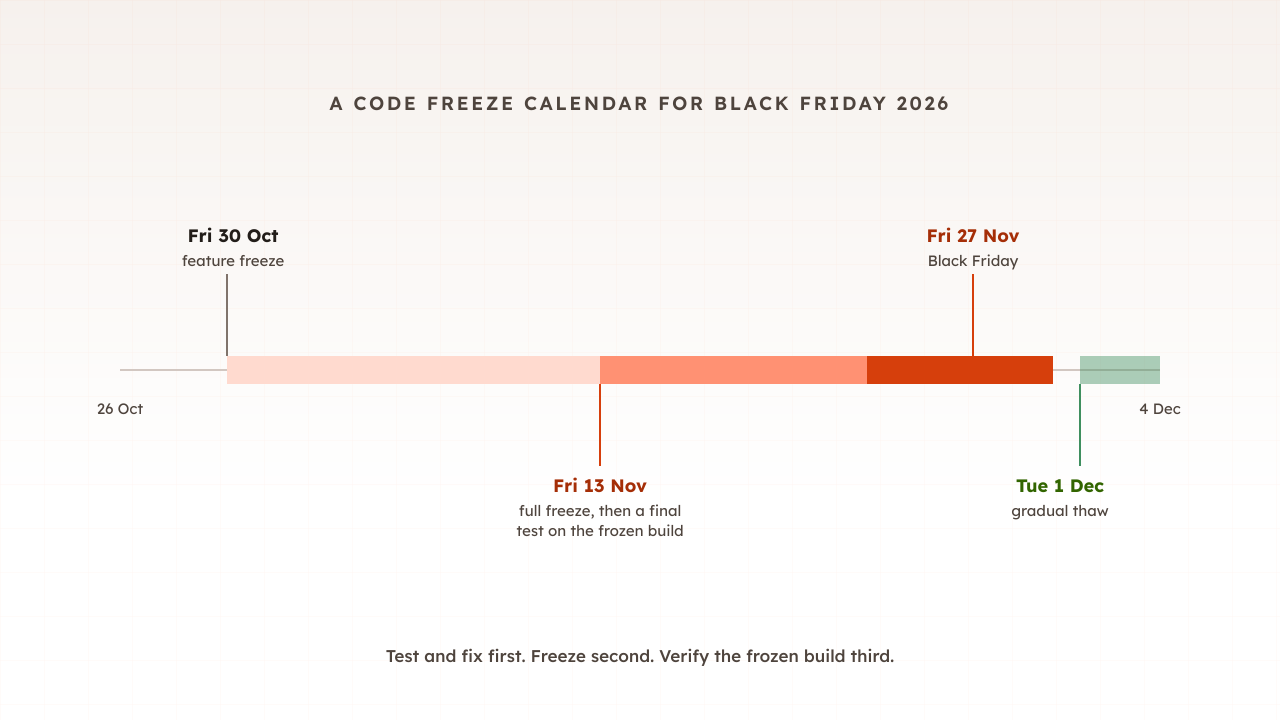
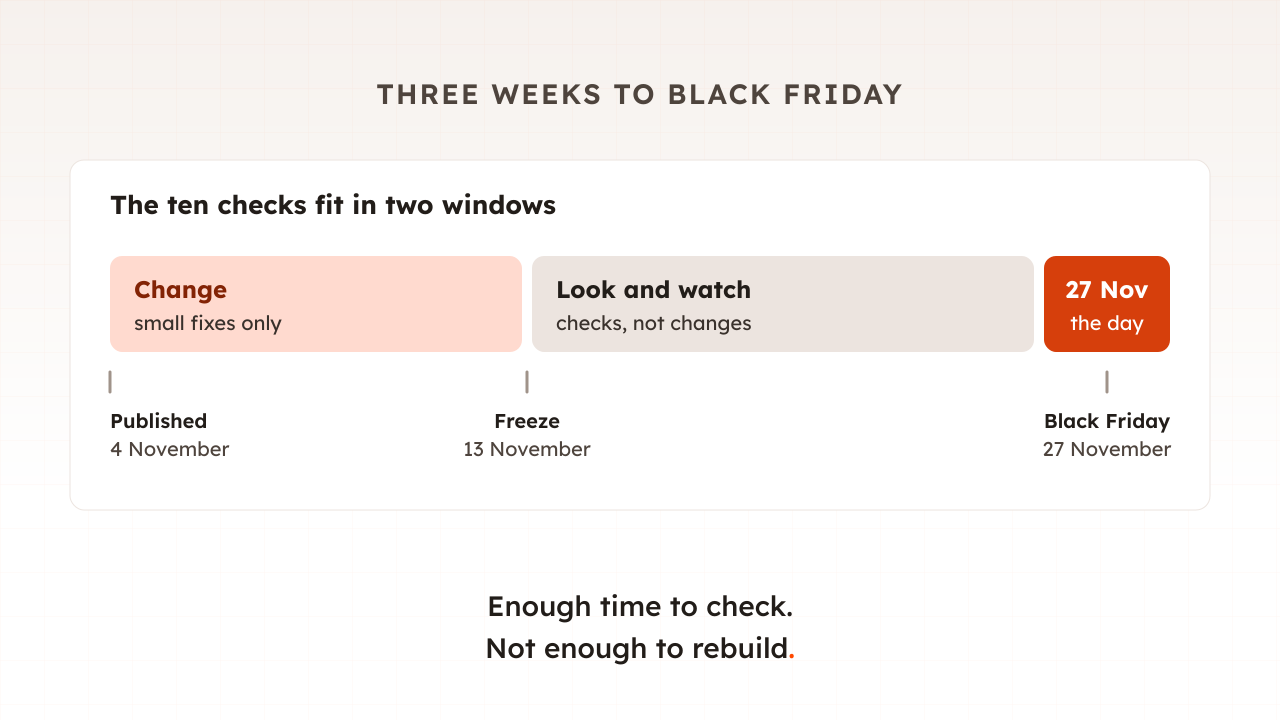
Enough to check, not enough to rebuild. Black Friday 2026 falls on Friday 27 November. If your code freeze starts two weeks before the day, as part 11 of this guide suggests, the working days before it are for small changes and the two weeks after it are for watching. So favour checks that only look, and keep every change small and reversible.
The busy season may also start before the day itself. Adobe’s 2026 forecast put online discounts at up to 14% in early November, rising to 21% just before Thanksgiving, and US online spending at $12.9 billion on Black Friday. Your traffic may climb through November rather than arrive in one morning.
Late changes are a risk of their own. When Microsoft’s Azure Front Door failed for more than eight hours from 29 October 2025, its review traced the trigger to customer configuration changes that exposed a hidden software fault, and to stop further damage the service automatically blocked all new and in-flight configuration changes from being deployed worldwide. A change you make three weeks out has less time to prove itself than one made in September.
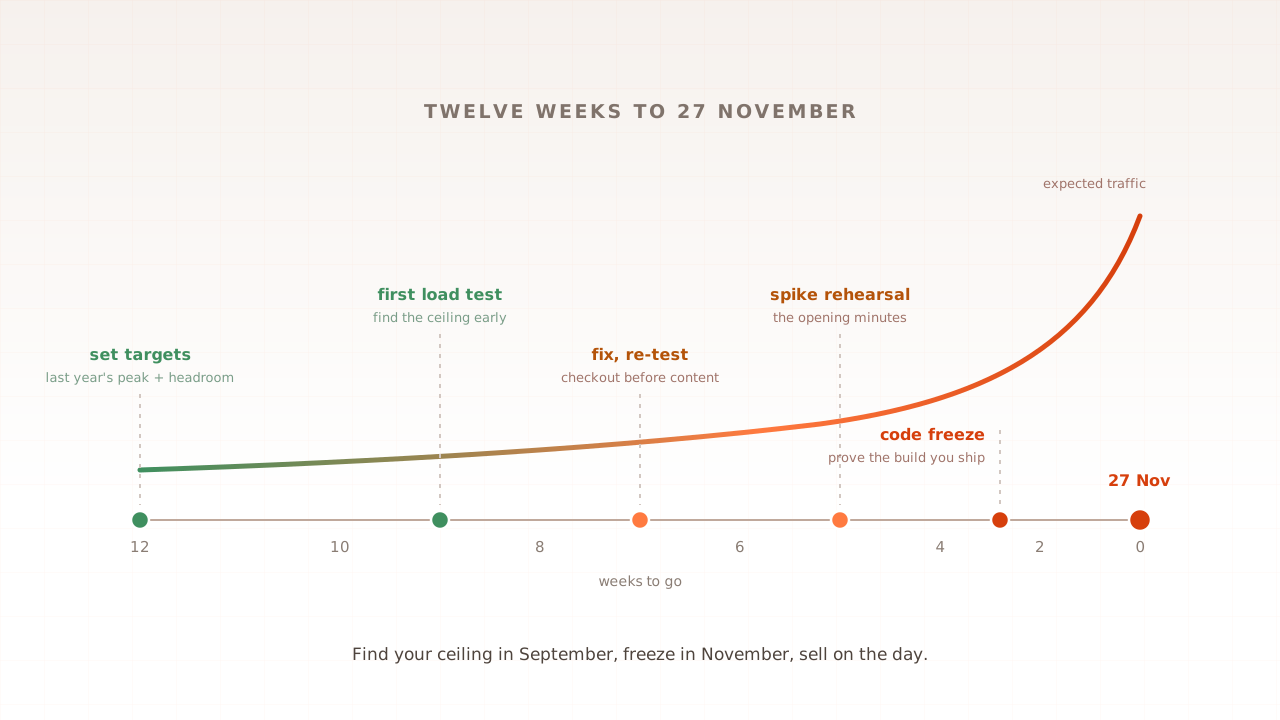
If you are earlier than this, the 12-week plan in part 1 is the better guide. This list is for everyone else.
| # | Check | Looks or changes | Do it by |
|---|---|---|---|
| 1 | Write down your peak number | Looks | This week |
| 2 | Load test the checkout journey once | Looks | This week |
| 3 | Fix only what the test found, then freeze | Changes | Two weeks before the day |
| 4 | List your dependencies and what you do when each fails | Looks | Two weeks before the day |
| 5 | Tell your payment provider and your host | Looks | Now |
| 6 | Check certificates, domains and DNS | Looks, small change | Two weeks before the day |
| 7 | Protect your cache | Looks, small change | Two weeks before the day |
| 8 | Pace your own emails | Looks | Before your sends |
| 9 | Rehearse the switches you already have | Looks | A week before the day |
| 10 | Write down who does what on the day | Looks | A week before the day |
What should you check this week?
Your peak number and your ceiling. Write down how many shoppers you expect at the busiest moment, then run one load test of the checkout journey at that level and above it. The test tells you whether you have a problem, how big it is, and whether there is time to fix it before the freeze.
1. Write down your peak number
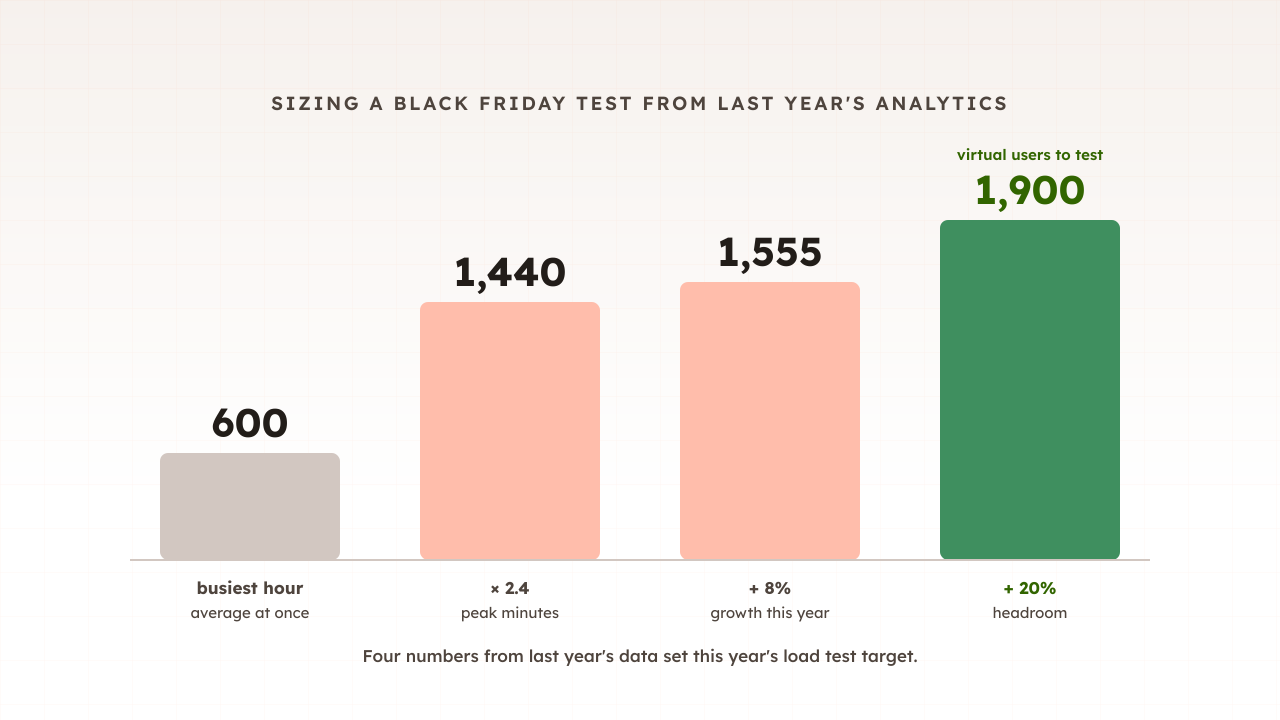
Pull last November’s busiest hour from your analytics, find the busiest minutes inside it, and scale for this year’s growth and offers. Part 9 of this guide walks through it in an afternoon. The output is one number: shoppers on the site at once at your peak, with a fifth or so added as headroom.
The scale of the day is easy to underestimate. Across Shopify’s merchants in 2025, sales reached a record $5.1 million per minute at 12:01pm Eastern time on Black Friday.
2. Load test the checkout journey once
Test the money path: search or category, product page, basket and checkout up to payment. A homepage test measures your CDN, not your shop. Run at your peak number, then above it, and note where response times start to climb.
Three rules keep a late test safe. Agree it with your host first. Do not send the load to your payment provider’s test mode. Stripe’s documentation says we generally discourage this practice because API limits are lower in a sandbox, and recommends mocking the payment call with realistic delays instead. And run it before early promotions bring real crowds.
If the ceiling is below your peak and there is no time to raise it, the measurement still has a use: it is the admission rate for a virtual waiting room.
3. Fix only what the test found, then freeze
Fix the one or two problems the test exposed, in revenue order, and re-run the same test to prove the fix. Then freeze code, configuration and tag-manager tags together, because third-party tags added after your last test have never met your peak.
What should you check before your code freeze?
The things outside your own code that can still take you down: the providers you depend on, the limits they set, the certificates and domains that can quietly expire, and the cache that keeps your servers from doing every request themselves. Most of these checks are reading and phone calls, not changes.
4. List your dependencies and what you do when each fails
Write down every outside service a shopper’s journey touches: hosting and cloud, CDN, DNS, payments, search, tax, email, the platform’s own login. Then, for each one, what happens if it fails and what you would do.
Autumn 2025 showed why. AWS’s outage in one of its US regions started at 11:48 PM PDT on October 19 and ended at 2:20 PM PDT on October 20, and was traced to a latent race condition in the DynamoDB DNS management system. On Cyber Monday, Shopify merchants had trouble logging in, and TechCrunch reported the problem was in its login authentication flow, which explains the POS login complications in shops. Your plan cannot stop either. It can decide in advance what you do, and how you tell customers.
5. Tell your payment provider and your host
Payment providers set rate limits. Stripe’s default in live mode is 100 requests per second across an account, and its documentation warns that a sudden increase in charge volume, such as a flash sale, might result in rate limiting. If you expect to hit the limits, contact support, and for a large increase do so at least 6 weeks in advance. Three weeks out, that means asking now and planning to live within today’s limits.
Shopify’s flash-sale guide gives the same advice to contact your payment provider to ensure they can support the volume of sales you expect, and suggests a second payment provider as a fallback. Hosts work the same way: Adobe Commerce Cloud asks for surge capacity tickets at least 48 business hours in advance, and warns that over Black Friday and Cyber Monday capacity during this period is limited.
6. Check certificates, domains and DNS
Check the expiry date of the security certificate on every hostname a shopper touches: shop, checkout, images, APIs and webhooks. Renewals now come round more often. As GlobalSign explains, the industry’s phased approach reduced lifespans from 398 days to 200 days on March 15, 2026 for public certificates, and Let’s Encrypt’s expiry reminder emails stopped: this service ended on June 4, 2025. A 200-day certificate issued in mid-May runs out around Black Friday itself.
Check domain renewals too. For DNS, leave providers alone, but know your record lifetimes (TTLs). Amazon’s Route 53 guidance is that for records you might switch in a failover, setting a TTL of 60 or 120 seconds is a common choice. Lower them only on records you have a real plan to repoint.
7. Protect your cache
Make sure nothing flushes the whole cache on the day, and that campaign links do not split it. Adobe’s Commerce documentation warns that clearing cache types during peak demand can increase load on the Admin and cause the site to go down until the operation completes. Its holiday guide adds that each unique tracking string in a URL creates a separate cache entry for what’s otherwise the same page, which lowers your cache hit ratio. Open your promotion landing pages with campaign links and check they are served from cache. Part 16 explains which caches matter.
What should you check in the final fortnight?
How you behave on the day. Your own emails can create the spike, your fallback switches only help if someone has flipped them before, and an incident goes better when everyone already knows their role. None of these checks changes code, so they fit inside the freeze.
8. Pace your own emails
A sale email sent to every subscriber at the same minute is a spike you created yourself. Many email tools can send in batches instead. Klaviyo’s gradual send delivers to a percentage of your recipients at a time, which it describes as useful for avoiding a spike in website traffic as recipients click through. Schedule the sends for when your team is watching.
9. Rehearse the switches you already have
Most shops have features they could turn off to protect checkout: recommendations, pop-ups, live chat, heavy tags. Pete Hodgson describes these as long-lived “Kill Switches” which allow operators of production environments to gracefully degrade non-vital system functionality under unusually high load. Shopify’s flash-sale guide lists recommended products and pop-ups among the settings to turn off. Flip each switch once on a quiet day and confirm it works. Building new switches now is new code, so only rehearse the ones you have.
10. Write down who does what on the day
Google’s SRE book puts preparation first: develop and document your incident management procedures in advance. Name who watches the dashboards, who decides to flip a switch, who talks to customers, and who holds the logins and support numbers for each provider on your list. Keep it to one page, and make sure your status page does not run on the same systems as your shop.
What should you not do three weeks before Black Friday?
Do not make changes that cannot prove themselves before the day. Moving hosting, DNS or CDN providers, launching features, adding tags, and switching on new security rules all carry more risk now than the problem they solve. Leave them until your peak season is over, when a mistake costs a normal day rather than one of the biggest.
- Do not migrate. A new provider has never served your peak.
- Do not add tags or features. Each one is an untested change on the busiest pages.
- Do not switch on aggressive bot rules at the last minute. New rules can block real buyers along with the bots.
- Do not load test the payment provider’s test mode. Mock the payment step instead.
- Do not flush caches during trading. Warm them gently, before the emails go.
- Do not trust autoscaling alone. New servers take minutes to start; pre-scale the night before.
How Evaluat fits into the last three weeks
Evaluat runs each virtual user in its own real browser, so one test this week can walk your checkout journey the way shoppers do, with every image, script and tag loading. The report shows response times and errors per URL, p95 and p99 percentiles, and Core Web Vitals, so you can see which step slows first and at what level.
When something fails, the evidence is per shopper. Every session keeps its video, network log and console log, so you can open the session where checkout timed out and see which request took the time. Build a scenario once. Use it everywhere: the same scenario re-runs after each fix, and once more on the frozen build.
The boundaries are worth stating. A load test finds the limit of your site, not of your payment provider or your CDN, which is why checks 4 and 5 are separate. Virtual users ramp up over minutes, so a test rehearses a rising peak rather than everyone arriving in the same second. And one test three weeks out is a measurement, not a guarantee; what you do with the result is what counts.
Three weeks is enough to know where your site will break and to decide what you will do about it. Measure first, change little, and write the plan down.
Test in real browsers. Debug in real sessions. Book a demo to test your checkout before your next peak.