



A plain-language verdict you can read on the way into the meeting, and what to fix first.
Tour a real report REAL-BROWSER PERFORMANCE TESTING
Slow pages lose sales.
Slow pages lose sales.
Find yours before your customers do.
Your busiest day, rehearsed in real browsers before it happens. You read the verdict; your engineers get the report.
Teams we've worked with
What slow costs
Where slow pages cost you money.
A minute of your busiest sale is worth more than a minute of any other day, and most teams have never put a figure on it. Set up the sale you are worried about.
Your sale
Those two are example figures, not your data. They sketch a big-ticket retailer on a peak sale day. Average order value swings enormously by sector, and order count is just revenue divided by it, so put your own numbers in before you quote the result to anyone.
£6,250 at risk
Revenue at risk
£6,250
30 minutes down in a 24 hour sale. About 25 orders. That is 97.92% uptime across this campaign, not across the year.
£208
Every minute is worth
0.83
Orders per minute
£300,000
Sale revenue
This spreads your orders evenly across the sale. Real sales are front loaded, so an outage in the launch hour costs more than this, and some interrupted shoppers do come back. Treat it as the order of magnitude, not the invoice.
Open the full calculatorAnd if it never goes down, just gets slow?
A site that stays up but crawls at checkout still loses the order. Hard down is a hosting problem. Slow under load is the one a performance test finds, and it is the more common of the two. Fair warning on the second slider: nobody publishes a measured abandonment rate for a site that is slow rather than down. We looked. So treat 20% as a placeholder to argue with, not a finding, and move it to whatever your own analytics say.
£2,500
on top, from about 10 abandoned orders
That is what half an hour costs you, and it assumes the site actually went down. Usually it does not. It stays up and slows to a crawl at checkout, shedding the same orders without ever registering as an outage. Hard down is a hosting problem. Slow under load is the one a performance test finds, and it is the more common of the two. Most load testing tools just ask your server if it answered. Evaluat opens your shop in many real browsers at your forecast peak, like real customers on real laptops, and watches what they actually see.
Checkout at peak
A checkout that slows under peak traffic sheds buyers at the exact moment you have the most of them. Evaluat rehearses your checkout at Black Friday numbers in real browsers and shows the point where it starts to drag. More on checkout under load.
The surge, not the average
The email goes out, or the spot airs, and everyone arrives in the same five minutes. That shape breaks sites that handle a busy day fine. Rehearse the surge, not just the volume. More on peak readiness.
The third-party tax
Analytics, reviews, chat, A/B tests. Each tag is small; together they tax every page view. The report shows which one costs you the most, so you can decide whether it earns its keep.
Speed and search
Google uses field page-experience signals, including Core Web Vitals, among other ranking factors. Evaluat measures related diagnostics under controlled load, so you can find and fix the slow pages that fight uphill for the traffic you don't pay for.
Teams run the same rehearsals for capacity planning, release validation, regional comparisons, and forensic debugging. Running a store? Start with ecommerce performance testing. How the testing works
The report · one real run
A verdict you can read. Evidence your engineers can act on.
"The site stayed up and served every request under 200 users, but pages loaded far too slowly and about 1 in 10 shopper journeys did not finish."
Written for the meeting, not the war room.
A health score, findings ranked by severity, and recommended fixes in plain language. Forward it as it is.
What's in a report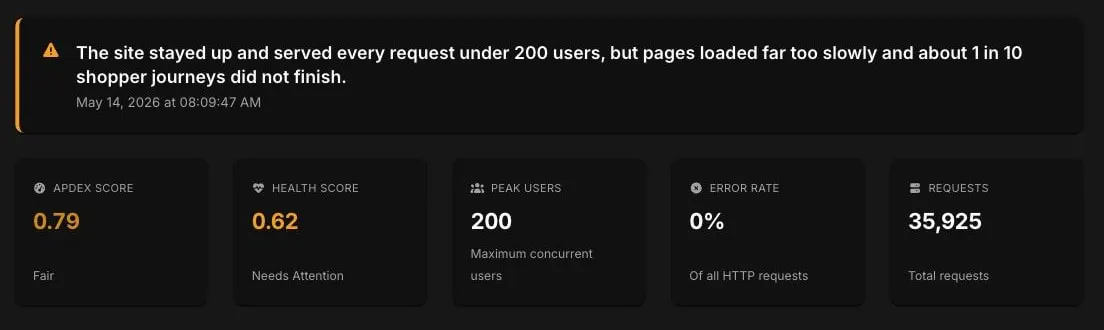
A failure at peak isn't a percentile. It's a session.
Open the session. Watch the moment it broke. The video, the network log, and the console output are there for every virtual user.
How session video works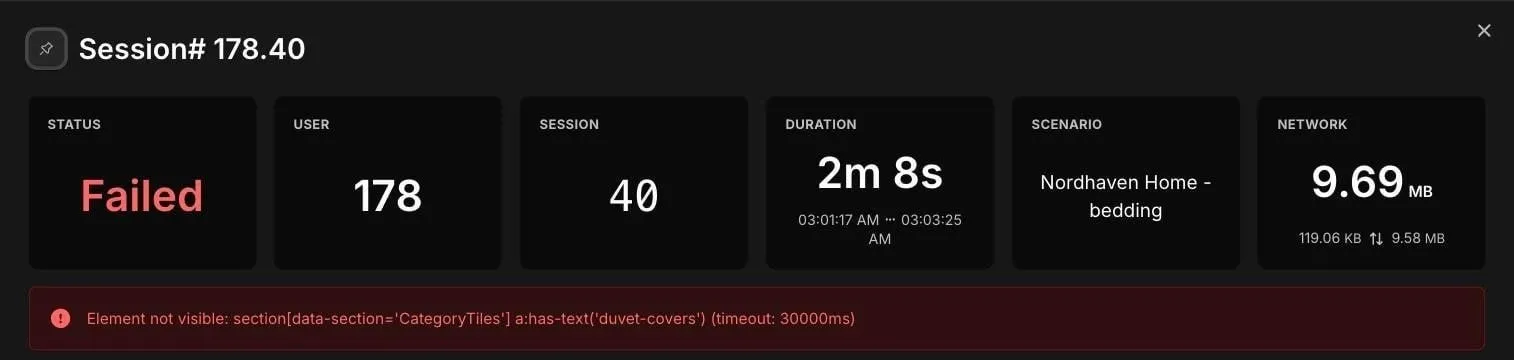
Working with us
Three steps to a straight answer.
- step 1 of 3
Build the journey once.
On the demo call we assemble your real journeys in the visual editor: home, product, cart, checkout. No scripts, no code.
- step 2 of 3
Run it at your peak.
Real browsers walk those journeys at your forecast traffic, from the UK and the EU, while everything is recorded.
- step 3 of 3
Read the verdict. Hand off the evidence.
You see what held, what slowed, and what broke. Your engineers open the exact sessions behind each finding.
Who reads what
One report. Three readers.
Proof the landing page holds at campaign traffic before the spend goes out.
Ecommerce performance testingThe deep half of this page is yours: what gets captured on every run, and how to check our work.
Skip to the engineering section For your engineers
The part your engineering lead will check.
Configured once at the project level. Captured for every virtual user. Open any session and see exactly what happened.
This is the half your engineering lead will want. The full mechanics, including datasets, popup handlers, and regional execution, are on How it works; it's written for them.
Test Scenarios
- Build a journey once. Reuse it everywhere.
- Step-by-step playback with pass/fail per step.
Core Web Vitals capture
- LCP, INP, and CLS for every virtual user, plus FCP.
- Aggregated by run, addressable per session and URL.
Session Video
- Watch any virtual user's browser end-to-end.
- Step playback timestamped to the millisecond.
Network & Console Logs
- Every request and every console message, per user.
- Searchable and deduplicated across the whole run.
Five views on the same run.
Evaluat is agent-ready: your team's AI agents can run a real-browser speed test over the Model Context Protocol and read the results back, no API key needed. Developer and agent reference
The lineup
One platform. Three products.
Build a scenario once for Performance Testing today. The same scenarios are designed to become CI smoke checks and continuous monitors when Testing Suite and Monitoring ship. Same definition, same forensic detail.
Performance Testing
Real-browser performance tests at your forecast peak. Track Core Web Vitals per session and per URL. Find what breaks before peak does.
Tour the platformTesting Suite Soon
Run the same scenarios as post-deploy smoke checks. Catch Web Vitals regressions before they reach customers, with the per-session detail of a full performance test.
Join the waitlistMonitoring Soon
Run your scenarios continuously from chosen regions. Alert on Web Vitals regressions, with session video to debug them.
Join the waitlist Common questions
Questions we get asked.
What is Evaluat?
Evaluat is a real-browser performance testing platform. Every virtual user runs in its own isolated browser instance, so you capture Core Web Vitals (LCP, INP, CLS) and Navigation Timing under load, plus full session video, network logs, and console logs for every user.
Do I need to be technical to use Evaluat?
Mostly no. Reports are written in plain language for non-technical readers, and you can generate an Executive Summary when you need the verdict fast. Building a scenario happens in a visual step editor with no scripts; the one technical bit is pointing steps at the right elements with CSS selectors, which is a job for your developer or your agency. The deeper views (session video, network logs, console logs) are there for them when something needs fixing.
How do I know if we need load testing?
Three common signals. A date is coming when traffic multiplies (Black Friday, a product drop, a press or TV moment). You are changing platform, theme, or checkout. Or the site already feels slower during promotions than on a quiet Tuesday. If any of those apply, one rehearsal will tell you where you stand.
What's in a test report?
Five detail views: Overview (aggregate Web Vitals, time-series), URL performance (every URL with its own metrics), Sessions (every virtual user, individually addressable, with video), Console logs (deduplicated and counted), Network logs (every HTTP request, searchable across the run). You can generate an Executive Summary on top: a plain-language verdict with a health score, the key findings ranked by severity, and recommended fixes. See what a report contains.
How does Evaluat differ from k6?
k6 sends HTTP requests and measures how fast your server responds. Evaluat runs real browsers and measures what users actually see: Core Web Vitals (LCP, INP, CLS), plus FCP and the full network and console for every session. Use k6 for API load tests. Use Evaluat for the customer-facing parts of your app. See all comparisons.
Can Evaluat tell me if my site is ready for Black Friday?
Yes. That is the most common first test: a rehearsal of your real journeys (home, product, cart, checkout) at the number of simultaneous visitors you expect at peak. Generate an Executive Summary for the verdict; the session-level detail shows your team exactly what to fix. Black Friday 2026 is November 27, and fixes need shipping time, so the useful testing window closes earlier than it feels.
Is there a free trial?
We don't run a self-serve trial. Every onboarding includes a 30-minute demo on your real site, with a small test run live. The report from that demo is yours to keep, whether you go ahead or not.
More answers on the FAQ page.