Why does Magento checkout fail first under load?
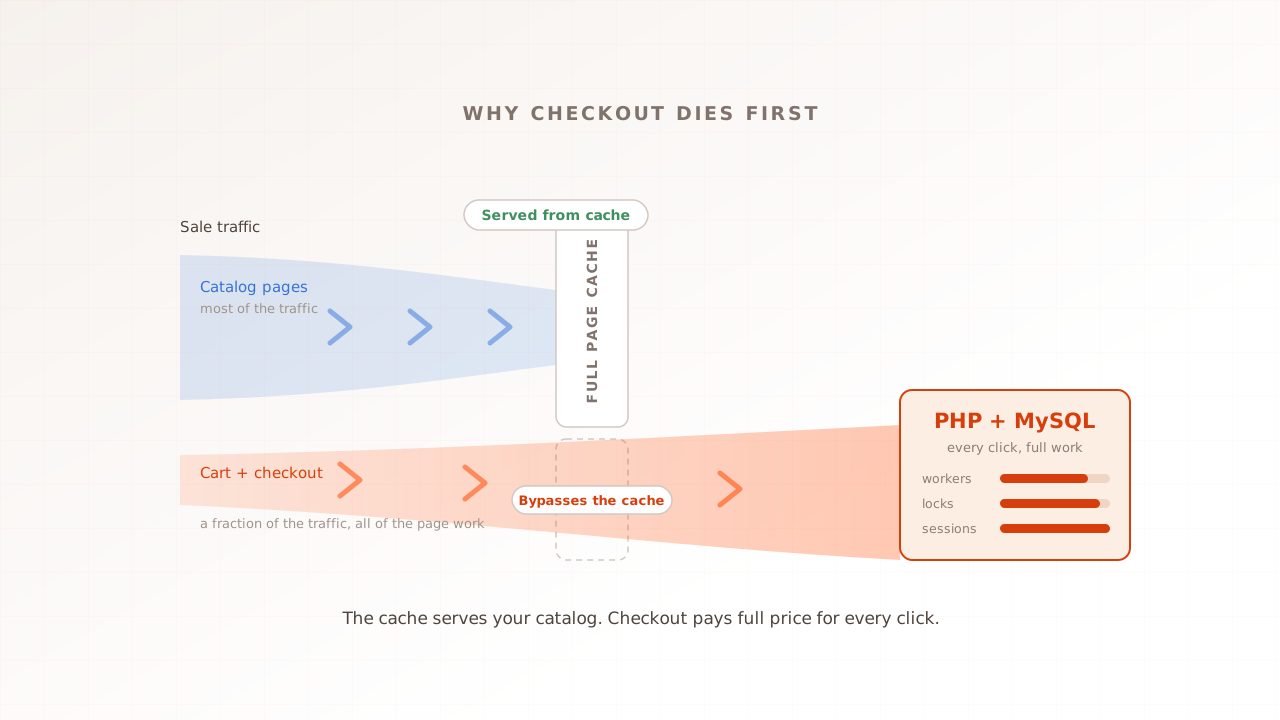
Magento checkout fails first because it is the one part of the store the cache cannot protect. Catalog pages are served from a stored copy; cart and checkout are rebuilt from scratch on every request. Under load, all of the pressure lands on the most expensive path the platform has.
Full page cache (FPC) is the layer, usually Varnish or Magento’s built-in cache, that stores a finished HTML page the first time it is built and hands that copy to every later visitor. Adobe’s documentation draws the boundary clearly: pages are cacheable by default, and cart and checkout are the standing examples of pages marked non-cacheable. A cached homepage costs the origin servers, the PHP and database machines behind the cache, almost nothing. A checkout step costs everything the platform has: PHP execution, database reads and writes, and often a round trip to a shipping or payment provider.
A supermarket is the honest analogy. The aisles are self-service: a thousand shoppers can browse at once without any extra staff. The tills are not. Every shopper who decides to buy has to pass through a staffed lane where items are scanned and payment is taken. Doubling the shoppers does not strain the aisles. It strains the tills. Magento’s catalog is the aisles; checkout is the tills.
The result is a store with two very different ceilings. The cached site can hold thousands of concurrent visitors without noticing. The uncacheable path, cart, checkout, login, anything personal, has a far lower ceiling. And that is the ceiling that matters, because the visitors on that path are the ones holding money.
What makes checkout impossible to cache?
A cache can only reuse a page that looks identical to many visitors, and cart and checkout are personal by definition: your items, your address, your shipping quote, your payment session. Magento marks these pages non-cacheable in its layout, so every request is built fresh by PHP and answered by MySQL.
Magento works hard to keep everything else cacheable. Personal fragments on catalog pages, the mini cart, the logged-in greeting, are fetched separately by JavaScript after the cached page arrives, a mechanism Adobe calls private content. That design is why the catalog scales so well. But it has a hard edge: the moment a visitor starts transacting, the whole page is private, and no cache layer can serve it. Adobe’s troubleshooting guidance states the consequence plainly: every request that is not served from cache adds load to the system and slows it down.
There is also a trap worth auditing before any sale. In Magento’s layout system, a single block marked cacheable="false" makes the entire page uncacheable, and an extension that adds such a block to a shared layout silently applies it to every page on the site. The store then behaves as if every page were checkout: each product view and category click hits PHP directly, and the origin drowns at traffic the cache should have absorbed. Adobe lists non-cacheable category and product pages among the common causes of degraded performance and outages, which makes checking cache hit rates on your busiest pages one of the cheapest pre-sale health checks there is.
How does a sale turn five times the traffic into fifteen times the load?
Because volume and mix shift together. On a normal day most visitors browse cached pages and only a few check out. During a sale, total traffic multiplies, and the share of visitors carting and paying multiplies too. The two factors compound, and the origin absorbs the product of both.
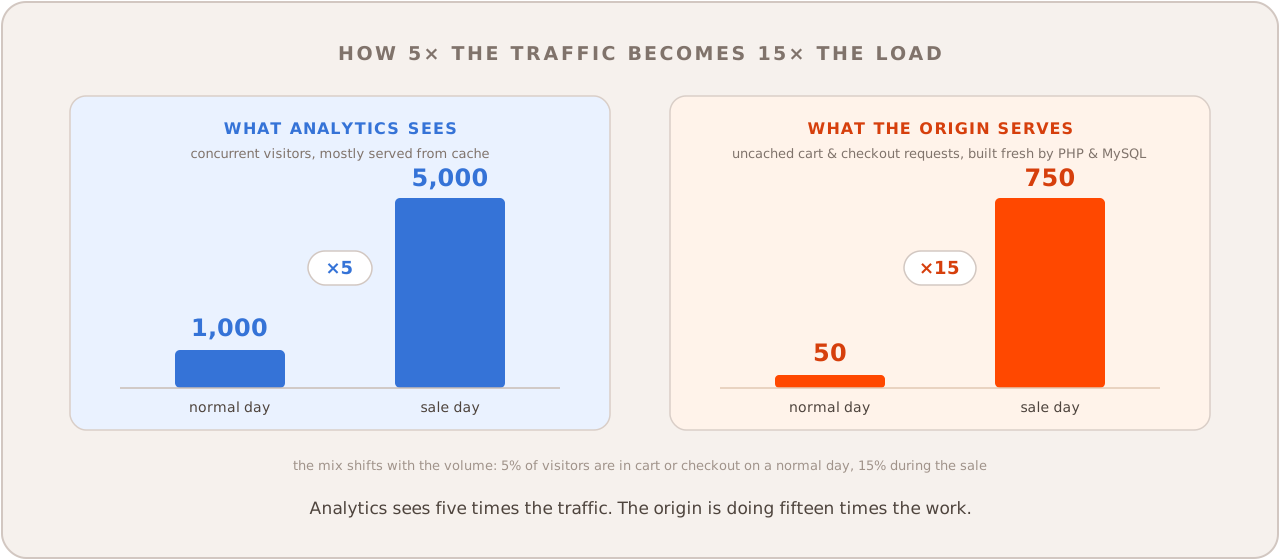
Put numbers on it. Say a normal day peaks at 1,000 concurrent visitors with 5% of them in the cart or checkout: the origin is really serving about 50 people. A strong sale brings five times the visitors, 5,000 concurrent, and because they came to buy rather than browse, 15% of them are carting and checking out. The origin is now serving 750 people, fifteen times its normal work, while the analytics dashboard says traffic merely went up five times. The cache absorbed the rest, which is exactly why the homepage still looks fine while orders stall.
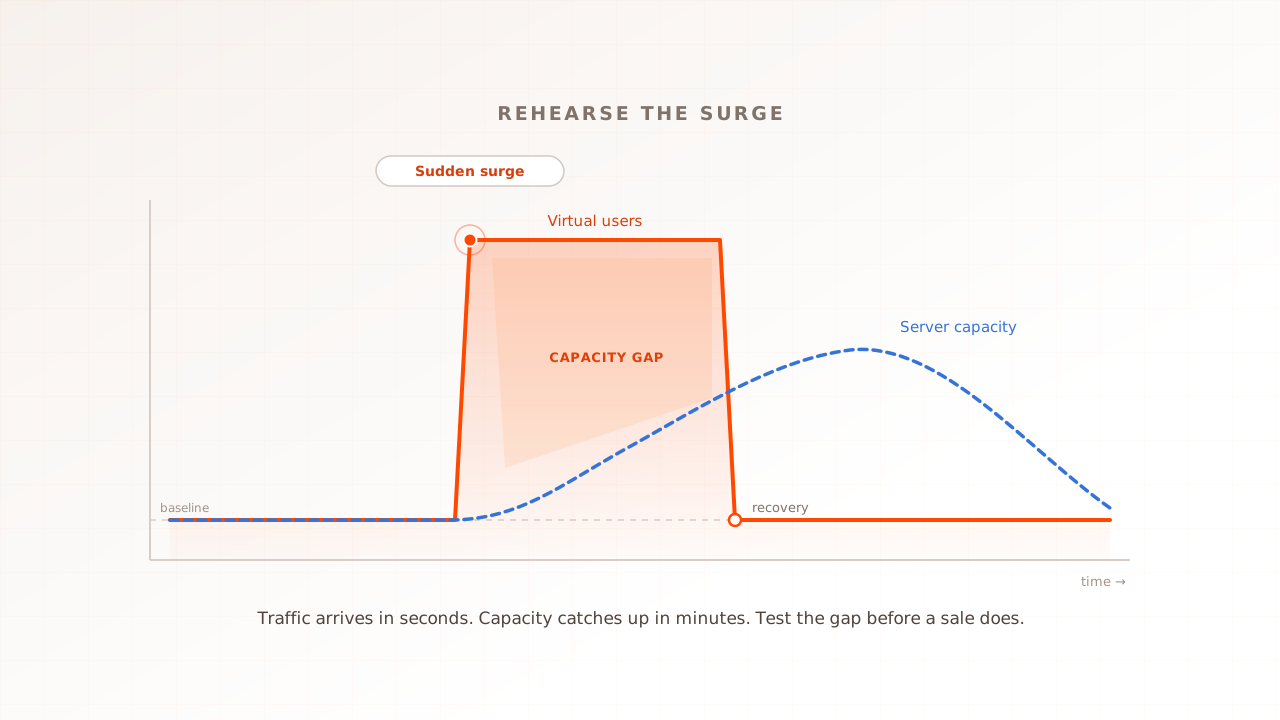
This is not theoretical. Magento agency Scandiweb described the pattern in 2019 after watching leading Magento retailers lose over $1 million in Black Friday sales to infrastructure failures triggered by traffic peaks: shoppers shift from cached category pages to cart and checkout, none of which are cached, and the result they observed was add-to-cart delays of 20 to 40 seconds, or a complete shutdown. The stakes have only grown since: Adobe Analytics measured a record $11.8 billion in US online sales on Black Friday 2025 alone. And when the surge arrives in minutes rather than hours, a flash sale or a TV mention, the mix shift lands before any autoscaling can react; that sharper case is covered in our guide to spike testing, and the calendar version, working back from the sale, is the 12-week Black Friday plan.
What actually breaks inside checkout?
Four things, usually in this order: the PHP workers that must now build every page by hand, the database rows that every cart and order is fighting to write, the session locks that serialize each shopper’s own clicks, and the third-party shipping and payment calls that hold workers while they answer.
| Layer | Role at checkout | How it fails under load |
|---|---|---|
| Full page cache (Varnish or built-in) | Bypassed; checkout is marked non-cacheable | It cannot fail here, and it cannot help either |
| PHP application servers | Render every step, recalculate totals and discounts | The fixed worker pool fills with slow requests; new ones queue or error |
| MySQL | Writes every cart change, stock movement, and order | Concurrent orders contend on the same rows; locks and deadlocks |
| Third-party APIs | Live shipping rates, payment authorization | Their latency occupies your workers; your peak is their peak too |
Every click is a full page build
With no cache in play, each checkout request runs the full Magento application, and above all totals collection, the process that recalculates the subtotal, discounts, shipping, and tax for the cart. Active cart price rules are evaluated against the cart as part of it, so a store carrying years of accumulated promotions pays for them on every cart update. The client side is heavy too: MGT Commerce’s March 2026 checkout analysis measured a default Magento checkout loading more than 270 JavaScript files, around 2.8 MB, before the form is usable. Checkout is the most expensive page for the server and the browser at the same time.
The database serializes carts and orders
Reads scale; writes contend. A cart in Magento is a database row (the platform calls it a quote), and every add, removal, and quantity change writes to it. Placing an order is a transaction, a group of writes that must succeed or fail together, spanning the quote, order, payment, and inventory tables. When hundreds of orders run in parallel, transactions wait on each other’s row locks, and the unlucky ones fail outright. This is documented behavior, not speculation: Magento’s issue tracker records lock wait timeouts and lost orders in guest checkout under concurrent load, and Adobe ships a dedicated patch, MDVA-38852, for catalog inventory locking tables when several parallel orders are placed. A flash sale on one popular product is the worst case, because every order has to touch the same product’s stock records.
Each shopper’s own clicks queue up
PHP serializes requests that share a session, the server-side record of who a visitor is and what their cart holds. In most configurations, while one request holds the session lock, the next request from the same shopper waits. Checkout fires several background requests in quick succession, address validation, shipping estimation, totals refresh, so one slow call blocks the shopper’s next click even on a quiet site. Under load every request runs longer, locks are held longer, and the checkout that felt instant at 10 concurrent users feels frozen at 500. Magento hosting providers trace checkout hangs under load to exactly this session-locking behavior.
Third parties set your speed limit
Live shipping rates and payment authorization are synchronous calls: PHP sends the request and the worker sits waiting for the answer. The same MGT Commerce analysis puts each live carrier-rate call at 2 to 3 seconds. PHP-FPM, the process manager that runs Magento, keeps a limited pool of workers, each handling one request at a time, so every worker parked on a slow gateway is a worker serving nobody else. This is the cascade that takes whole stores down: your sale peak is also your payment provider’s peak, their responses slow, your worker pool fills with waiting processes, and requests that have nothing to do with payment start erroring because no worker is free to serve them.
Why did your load test say the site was fine?
Because it probably tested the cache. Pointing ten thousand virtual users at the homepage measures how fast Varnish can serve a stored copy, a number no store struggles with. The checkout ceiling, the one that actually breaks during a sale, only shows up when the test logs in, carts, and pays.
A virtual user is a simulated visitor driven by a testing tool, and for the test to exercise checkout at all, each one needs its own session and its own cart. A thousand virtual users sharing one cart collapse onto a single database row and measure a scenario that cannot occur in production. They also need realistic data, distinct accounts, addresses, and products, or caching and locking behave nothing like a real sale.
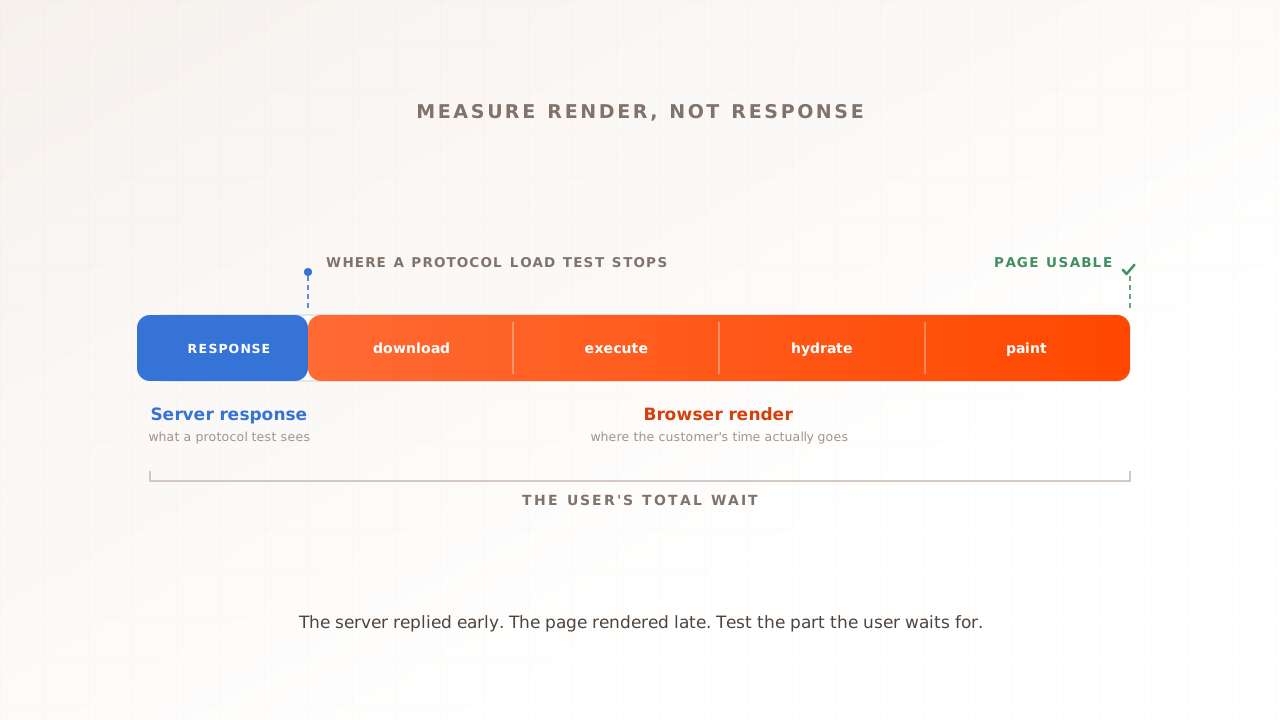
The tooling for this exists and is honest work. Magento itself ships a JMeter-based performance toolkit for benchmark scenarios, and protocol-level tools like JMeter can script the full checkout flow, handling per-user data and Magento’s form keys, the anti-forgery tokens each session carries. For raw concurrency against APIs they are the right instrument. What they measure, though, is the server’s side of the conversation. Checkout is also the heaviest page the shopper’s browser has to execute, so the gap between “the server answered in 800 ms” and “the shopper could press Place Order” is widest exactly where the money is. Our guide to the three load-testing models covers that divide in depth.
How do you load test Magento checkout properly?
Test the journey, not a URL. Give every virtual user its own account, cart, and data, ramp past your expected peak, and read the results per checkout step. You are looking for one number: the concurrency at which checkout stops meeting your targets. Then fix the first bottleneck and run it again. The same method extends store-wide; see Magento load testing for the catalog-to-checkout version.
- Script the full journey. Product page, add to cart, cart, shipping, payment. Run it against a staging environment with the payment gateway in sandbox mode, so the test never captures real charges. The journey is what shoppers do, and the journey is what breaks.
- Give every virtual user unique data. Separate accounts, addresses, and a spread of products. Shared data understates locking and overstates caching, and both errors flatter the result.
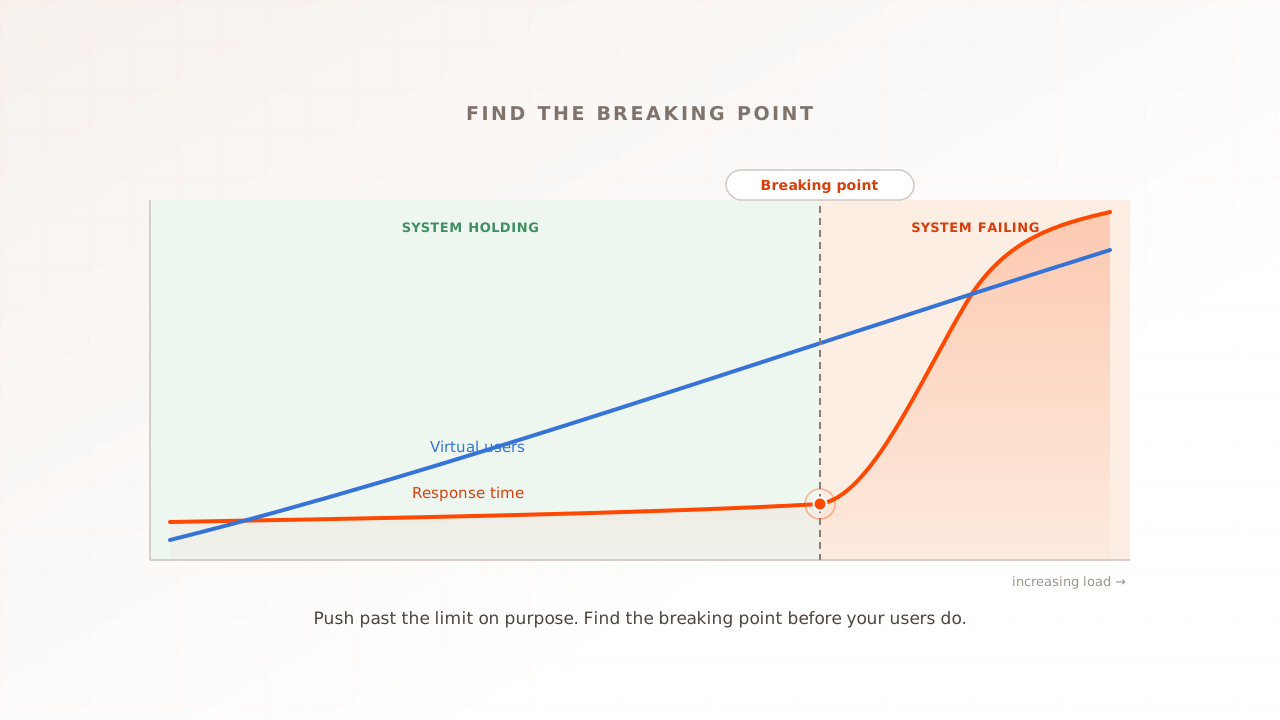
- Find the checkout ceiling on purpose. Ramp virtual users in steps past your expected sale peak until error rates and response times turn upward together. The method is the same as stress testing a website, pointed at the path that fails first.
- Read the results per step. A p95 response time (the time your slowest one-in-twenty requests exceed) that spikes on the shipping step points at a carrier API; errors concentrated on order placement point at database contention. Aggregates across the whole journey hide the suspect.
- Watch the shopper’s side, not just the server’s. Core Web Vitals, Google’s user-experience metrics, usually degrade under load before errors appear, and measuring them during the test shows what the slowdown felt like. The margin is worth real money: Google and Deloitte’s 2020 study Milliseconds Make Millions found a 0.1 second mobile speedup lifted retail conversions by 8.4%.
- Re-test before every sale, not once ever. Extensions, promotions, and catalog growth all move the ceiling. In Baymard Institute’s checkout research (updated September 2025), 15% of shoppers who abandoned an order cited the site crashing or showing errors, and the cheapest place to find those errors is a test.
How Evaluat load tests Magento checkout
Evaluat is a real-browser performance testing platform: each virtual user runs in its own isolated browser instance and walks through the store the way a shopper would, while the platform captures Core Web Vitals, session video, network logs, and console logs for every user. You build the journey once, browse, add to cart, check out, in a visual scenario editor with no scripting; Datasets feed each virtual user its own login, address, and search terms; popup handlers dismiss the cookie banners every European storefront carries. Tests run from the region closest to your customers.
When checkout gives way at peak, the report shows where, per step: the per-URL view separates the catalog pages that held from the checkout steps that did not, and the network log of any session shows which call stalled, a shipping-rate request, a totals refresh, a payment redirect. A failure at peak isn’t a percentile. It’s a session. Open the session. Watch the moment it broke.
Two honest boundaries. Evaluat watches your store from the outside: it shows which request was slow and what the shopper experienced, but finding the lock inside MySQL still takes your server-side monitoring. And for raw protocol concurrency, thousands of API requests per second with no rendering, an HTTP tool like k6 or JMeter is the lighter instrument. The real-browser model earns its cost exactly where this article lives: on the JavaScript-heavy, personal, uncacheable path where server timings and shopper experience part ways.
Find the checkout ceiling before the sale does
The asymmetry is the lesson. A Magento store is two systems wearing one domain: a cached catalog that scales almost for free, and an uncacheable checkout that pays full price for every click. Traffic numbers describe the first; revenue depends on the second. The decision you can now make is concrete: stop load testing the homepage, script the journey that takes the money, and find the concurrency at which it stops holding, before a sale finds it for you.
Evaluat runs every virtual user in a real browser through that exact journey and keeps the evidence per session, video, network logs, console logs, Web Vitals, so the step that broke is something you watch, not something you infer.
For the commercial framing of that rehearsal, see Magento performance testing, checkout performance testing, ecommerce performance testing, and peak readiness.
Test in real browsers. Debug in real sessions. Book a demo.